MyFormat
Mapping Rules + Engine = Conversion
Proprietary payload
Spreadsheet / JDBC / Java API
Standard payload
MT to CSV / XML Export
Extract data from MT messages into CSV, XML, or any flat-file format. Handles repetitive sequences by generating multiple output rows, with configurable row identifiers for headers, transactions, and footers.
// Load mapping rules from spreadsheet
MappingTableExcelLoader loader =
    new MappingTableExcelLoader(
        getResourceAsStream(
            "/myformat/mt2csv.xls"));
MappingTable table =
    loader.load("example 1");
table.setSourceFormat(FileFormat.MT);
table.setTargetFormat(FileFormat.CSV);

// Translate
String csv =
    MyFormatEngine.translate(fin, table);

// Output:
// HR,5362/MPB,1234567890,FOOBAR CORP
// TX,123,EUR,1250.0
// TX,124,EUR,1875.0
// FR,EUR,3135.0CSV / XML to MX Ingestion
Transform proprietary flat files into fully typed MX (ISO 20022) messages. Map CSV columns or XML elements directly to MX message paths, with automatic schema-aware object construction.
// Load mapping rules
MappingTable table =
    loader.load("example1");
table.setSourceFormat(FileFormat.CSV);
table.setTargetFormat(FileFormat.MX);

// Set the target MX type
table.add(new MappingRule(
    MxTypePacs.pacs_008_001_02
        .mxId().id(),
    SetupCommand.mxType.name(),
    WriteMode.SETUP));

// Source CSV row
String input = "ABCDUSXXXXX,"
    + "FAB2019051402400300005,"
    + "0037 0039 RUE BOISSIERE,"
    + "75116,PARIS";

// Translate to MX
String out =
    MyFormatEngine.translate(input, table);
MxPacs00800102 mx =
MxPacs00800102.parse(out);Programmatic Mapping Rules
Define mapping rules entirely in Java code for maximum flexibility. Create MappingTable instances programmatically, apply inline transformations, and process multiple messages in batch using CsvFileWriter.
// Define mapping rules programmatically
MappingTable t = new MappingTable(
    FileFormat.MT, FileFormat.CSV);

t.add(new MappingRule("20", "0"));
t.add(new MappingRule("21", "1"));
t.add(new MappingRule("B/32B/1", "2"));
t.add(new MappingRule("B/32B/2", "3",
    new Transformation(
        Key.replace, ",", ".")));
t.add(new MappingRule("B/58A/2", "4",
    new Transformation(
        Key.prepend, "#")));
t.add(new MappingRule(
    "C/72/Line[2]", "5",
    new Transformation(
        Key.stripStart, "/")));

// Batch processing
CsvFileWriter writer =
    new CsvFileWriter(out);
for (String msg : messages) {
    writer.write(
        MyFormatEngine.translate(msg, t));
}Supported Format Pairs
CSV
Comma-separated values with configurable delimiters, quoting, and multi-row output for repetitive sequences.
XML
Arbitrary XML structures for system integration. Map between XML elements and MT/MX fields bidirectionally.
JSON
JSON output for REST API integration and modern system interoperability. MT-to-JSON conversion support.
MT (FIN)
SWIFT MT messages as both source and target. Field-level selectors with sequence, tag, and component access.
MX (ISO 20022)
ISO 20022 MX messages as both source and target. XPath-style selectors for MX element paths, all types and versions.
Fixed-Length
Position-based flat files with configurable field widths. Common for legacy banking system integration.
Spreadsheet & JDBC Mapping Rules
Define and maintain mapping rules in standard spreadsheets (.xls), or load them from a database via JDBC. Each mapping table contains source selectors, target selectors, and optional transformations. Non-developers can configure new transformations without touching code, while enterprise deployments can centralize rules in a database.
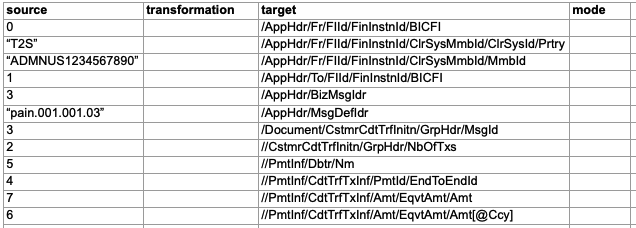
pain.001 element paths, covering both the business application header and the document body.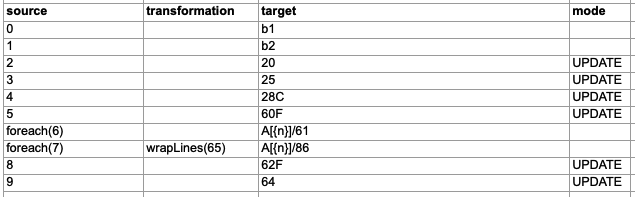
foreach() for repeating sequences and wrapLines() to split narrative text across lines.